Codex: 5 ways to use fewer tokens

In this article
RTK, CodeGraph, Caveman and three focused agents: five practical ways to reduce noise in Codex context and measure the result.
Filter command output with RTK, query code structure with CodeGraph, use Caveman for concise replies, and delegate only scoped goals. Measure each change.
Verbose terminal output, repeated repository searches and long replies fill Codex's context. These five changes give the model less noise and more useful evidence. Measure them on your own project: none guarantees extra Codex quota on its own.
1. RTK: compress command output
RTK (Rust Token Killer) is a Rust CLI proxy. It filters output from git, rg, tests and other commands before that output reaches the model. The single compiled binary is lightweight; the metric to track here is output tokens.
rtk init -g --codex
rtk git status
rtk test npm test
rtk gain
Install the binary from the official releases, then initialize it. For Codex, initialization writes AGENTS.md and RTK.md guidance; it does not intercept every command automatically. On native Windows, call rtk explicitly.
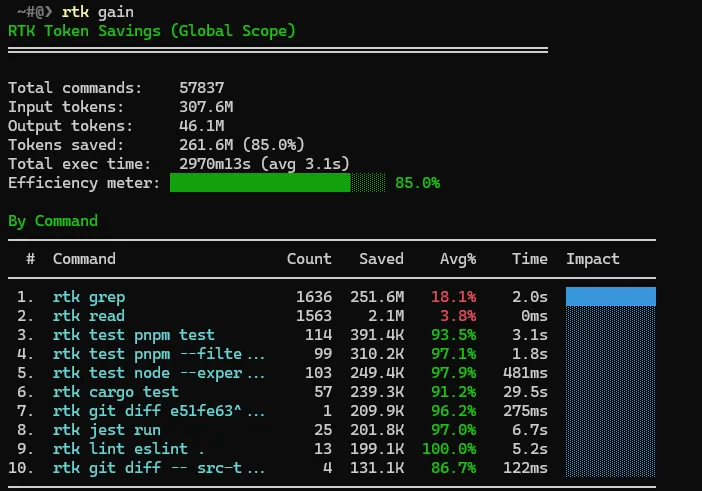
In the screenshot below, rtk gain reports an estimated 261.6 million command-output tokens saved (85%) across 57,837 commands in global scope. This is filtered command output, not an 85% reduction in total Codex usage or limits.
2. CodeGraph: find relevant code without opening everything
CodeGraph indexes symbols, calls and dependencies, then exposes the graph to Codex through MCP. Recent releases use a Rust parsing kernel with a bundled runtime. Structural queries can replace many exploratory file reads, but actual savings depend on the repository and the task.
npm i -g @colbymchenry/codegraph
codegraph install
cd your-project
codegraph init
codegraph status
install connects the agent; init builds a project index. To measure impact without a “tokens saved” screenshot, ask the same question in two clean sessions, one with CodeGraph and one without. Example: “Where does authentication start, and which functions call it?” Compare tool calls and session tokens with /status. Include the one-time indexing cost across several tasks.
3. Caveman: fewer words, same precision
Find Caveman in the official ChatGPT/Codex plugin marketplace. The project is by Julius Brussee, not OpenAI. Use it to compress response prose: ask for “diagnosis, change, verification, risk” in a few lines. Keep code, commands, paths, exact errors and security warnings intact.
Example: “New object prop on every render causes a re-render. Stabilize it with useMemo.” The answer is short, but the cause and action remain clear. Request more detail when the decision needs it.
4. Three agents for one scoped goal
Create one file per agent under ~/.codex/agents/. Astra plans and gives clear criteria, Luna implements, and Sol writes and runs tests against those criteria. Agents also add context and calls, so reserve them for defined goals.
# astra.toml
name = "astra"
description = "Plan scoped goals and guide implementation and tests."
model = "gpt-6-astra"
developer_instructions = "Define scope, acceptance criteria and handoffs for Luna and Sol. Be concise."

# luna.toml
name = "luna"
description = "Implement code for an approved scoped goal."
model = "gpt-6-luna"
developer_instructions = "Implement Astra's plan; keep changes focused. Prefer RTK for supported noisy commands."

# sol.toml
name = "sol"
description = "Write and run tests for Luna's changes."
model = "gpt-6-sol"
developer_instructions = "Use Astra's acceptance criteria. Write meaningful tests, run focused checks and report failures. Prefer RTK."
Example prompt: “Goal: fix login. Astra defines file scope and acceptance criteria; Luna changes code; Sol writes tests. Return only results and risks.” The custom agent TOML files require name, description and developer_instructions.
5. Keep global instructions short and in English
Put persistent guidance in ~/.codex/AGENTS.md. Codex reads this global instructions file; it is not a literal system prompt. Keep it concise and in English, then measure the result rather than assuming a fixed language-based saving.
# Global Codex instructions
- Keep answers brief and precise; report result, evidence and risks.
- Prefer RTK for supported noisy commands, including in agents.
- Use Caveman for concise prose; preserve code, paths, errors and warnings.
- For explicit, scoped goals only: Astra plans; Luna codes; Sol writes tests using Astra's criteria.
- If tools, agents or plugins fail, inspect ~/.codex/config.toml and the active plugin list.
Guidance does not force RTK to run. Check the commands that actually ran. If an agent ignores a rule, inspect project instructions too: they may override global guidance.
Extra: audit enabled plugins
After a model update, review enabled plugins. Outdated or conflicting instructions can add context and interfere with a task. Disable the suspected plugin, repeat the same task and compare results. If issues remain, inspect ~/.codex/config.toml.
Key takeaways
- RTK reduces command-output tokens, not the entire Codex session.
- CodeGraph helps when a prebuilt index replaces repeated code searches.
- Concise instructions and scoped agent goals avoid unnecessary context and output.
Frequently asked questions
Does RTK cut total Codex usage by 85%?
No. The screenshot estimates savings in RTK-filtered command output, not total session usage or Codex limits.
How do I measure CodeGraph’s benefit?
Repeat the same question in clean sessions with and without CodeGraph. Compare tokens and tool calls, then account for indexing cost.
When should you use Astra, Luna, and Sol?
Use them for scoped goals that need separate planning, implementation, and tests. On small tasks, coordinating three agents may cost more than it saves.